Tagged update


Week 12 Update


This week I worked on completing a rough proof of concept for the driving/bidding/shopping game. This meant getting the functionality and physical inputs to work and not conflict with each other. My goal is to have all three interactions be simultaneous, without awkward pauses. This will create the most frantic and overwhelming experience.

Development Updates

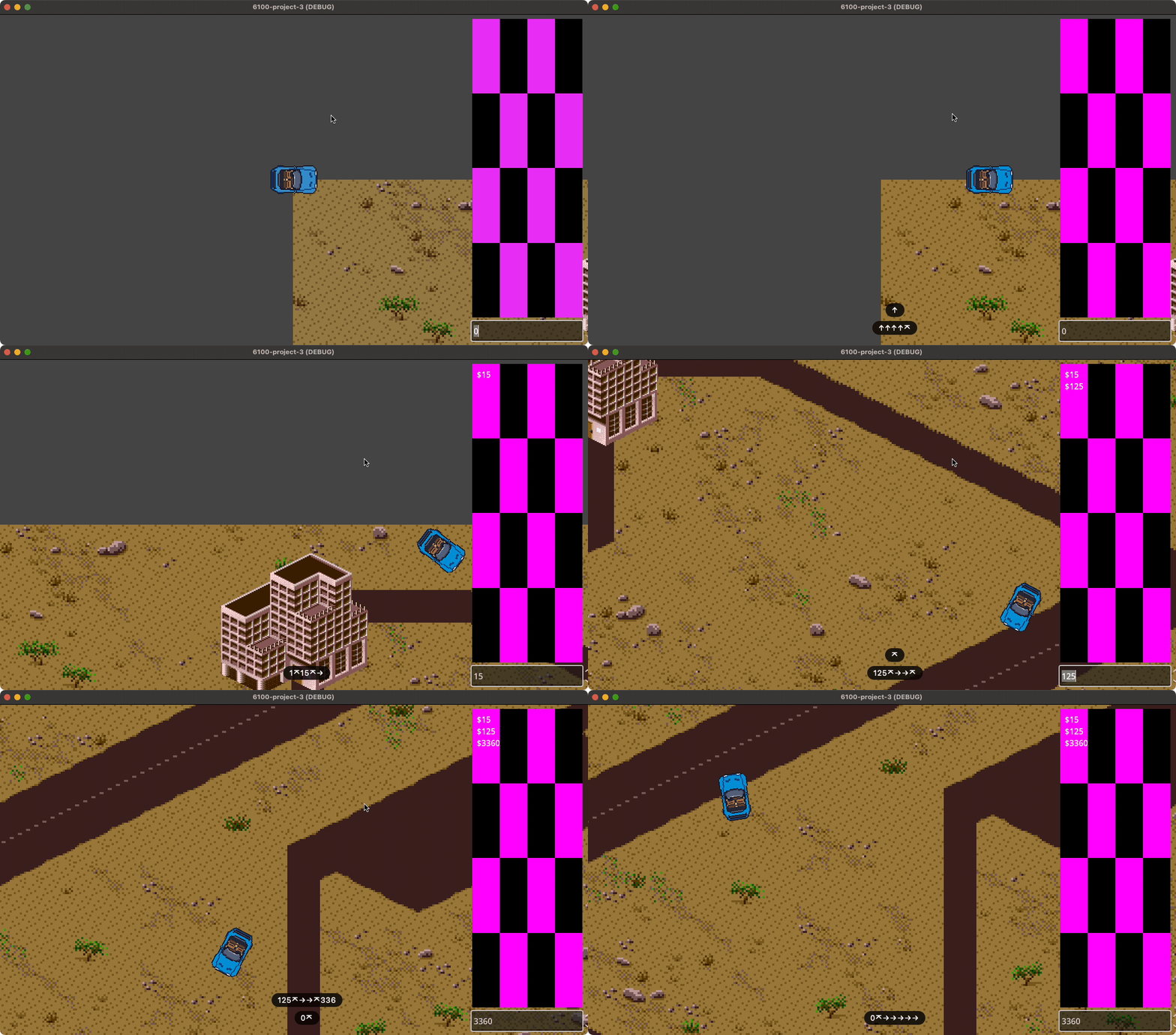
I cobbled together a scrollable list of placeholder items that will eventually house the shopping part of the game. At first the scrollable list and the text input were fighting for focus – you had to click in and out of them, which was not ideal for the game. I eventually found a fix that keeps the focus in the textbox and just fakes the focus for the scrollable items. That will allow me to keep all the inputs separate for each part of the game and avoid conflicts.

Here’s a demo of the game while driving, scrolling items and typing numbers all at once-ish:

Physical Devices

Another bonus this week was finally receiving all my input devices from Amazon/eBay. Here are some notes on getting those set up:

USB Volume Knob

The knob worked right away when I plugged it in, which meant that it also controlled the volume up and down while using it in the game - definitely more frantic but not a great experience. I found a video in Mandarin (with English subtitles) that showed how to reconfigure the knob using a blank text file 🤯. I eventually got it working with the game by mapping the knob turns and clicks to F1, F2 and F3 keys (again, to avoid conflicts with other inputs and the text field). The knob will be used to scroll and click the shopping list.

image of the usb knob config video

10-Key Number Pad

This also worked as expected right away, as it’s a keyboard. Godot easily distinguishes between number pad keys and the top row numbers, so this will be easy to integrate. The 10-key will be used to enter bids for new mowing jobs, in a text/messenger like format.

USB Steering Wheel and Pedals

The most satisfying piece of equipment in this setup, the Logitech WingMan Formula GP is a USB steering wheel and pedal controller from around 1999 – 2000. It was also cheap enough on eBay that I could risk it not working with modern computers. To my surprise, the computer recognized it right away, but nothing was mapped to it. A short search led to Enjoyable, a homespun app for mapping controllers to other keys/mouse events:

image of Enjoyable app

27 years later, the wheel and pedals still work! They will drive the lawnmower and add another dimension of frustration with the foot controls.

Test Setup

Here’s a photo of the setup after getting it all working. My desk is too thick to clamp the wheel to it, so I’ll need to make some kind of jig or find a new table.

image of my desk with all three physical devices plugged in

Up Next


Week 11 Update


This week I began sketching and prototyping for Project 3, the perspective inversion exploration. I began by mapping out the qualities of my last few projects and their opposite polarities:

Recent Projects Opposite Polarity
Non-commercial Hyper-commercial
Reflective Instinctual/guttural
Qualitative/Personal Quantitative/Impersonal
Calm Stressful
Non-goal oriented (Atelic) Goal Oriented (Telic)
Present/Aware Distracted

These help map out the end experience I want for the participant: overwhelming, stressful and impossible to manage. However, it also needs to be fun and engaging, at least at first – the player/participant must be willing to enter into the critical dialog in the first place. By embracing the hyper-quantitative and distracted qualities of interaction design, the intervention will aim to generate critical awareness by becoming increasingly terrible to participate in. I can really lean on my previous experience in UX and e-commerce for this project: just do the opposite of everything that's good and holy (or for the corporate-speak crowd: by leveraging worst practices).

My initial sketches for creating this experience involved using multiple, simultaneous points of interaction to create an impossible to manage, always out of control dynamic. After some more ideation, I landed on a concept of simultaneously trying to 1) mow lawns to earn money, 2) spend money buying trinkets online and 3) text with potential clients to line up new mowing jobs. If this was an arcade game, it could look something like this:

sketch of multiple interactions in one game

I committed to the approach buy purchasing a used USB racing wheel, a 10-key number pad and a USB volume spinner/button that will serve as the controls for the game. While I wait for those to arrive, I started testing prototype interactions in Godot. I got a little bogged down trying to figure out how all the game mechanics and systems would work together, which felt dispiriting. I jotted down some loose notes before deciding that I should just start coding the thing and I'd figure out the guts later.

My new goal for the week was to get something working in Godot and see if I can control multiple parts of the game/UI at the same time. I found a prototype that I made last summer while learning Godot: it's a top-down driving prototype for a car game. With a little moxie, it could also work as a mowing game. I added a number input and a text placeholder to try passing number values from the keyboard to the UI. So far everything is working, and the next goal would be to add a scrollable list of things for the shopping mechanics. Driving and typing numbers at the same time already feels impossible, so I think it's on the right track.

week 1 POC progress - driving and typing numbers at the same time